AS2 receiver
An AS2 receiver listens for messages from your partners. This page explains its settings, its ports, serving HTTPS, and the limit on requests at the same time.
What the receiver does
The receiver is the only part of MicroB2B your partners connect to.
It listens on an address, a port and a path, for example https://as2.example.com/as2.
For each message it finds your organization and the partner, decrypts and checks the message, and answers with a receipt when asked.
Then your routes pass the message on.
A fresh installation has one receiver.
You can add more under Plugins > AS2 Receivers with + New AS2 Receiver.
In the REST API it is POST /api/v1/plugins/configs?type=as2-receiver.
A new or changed receiver takes effect when it restarts. Restart it under System > Services, or restart MicroB2B.
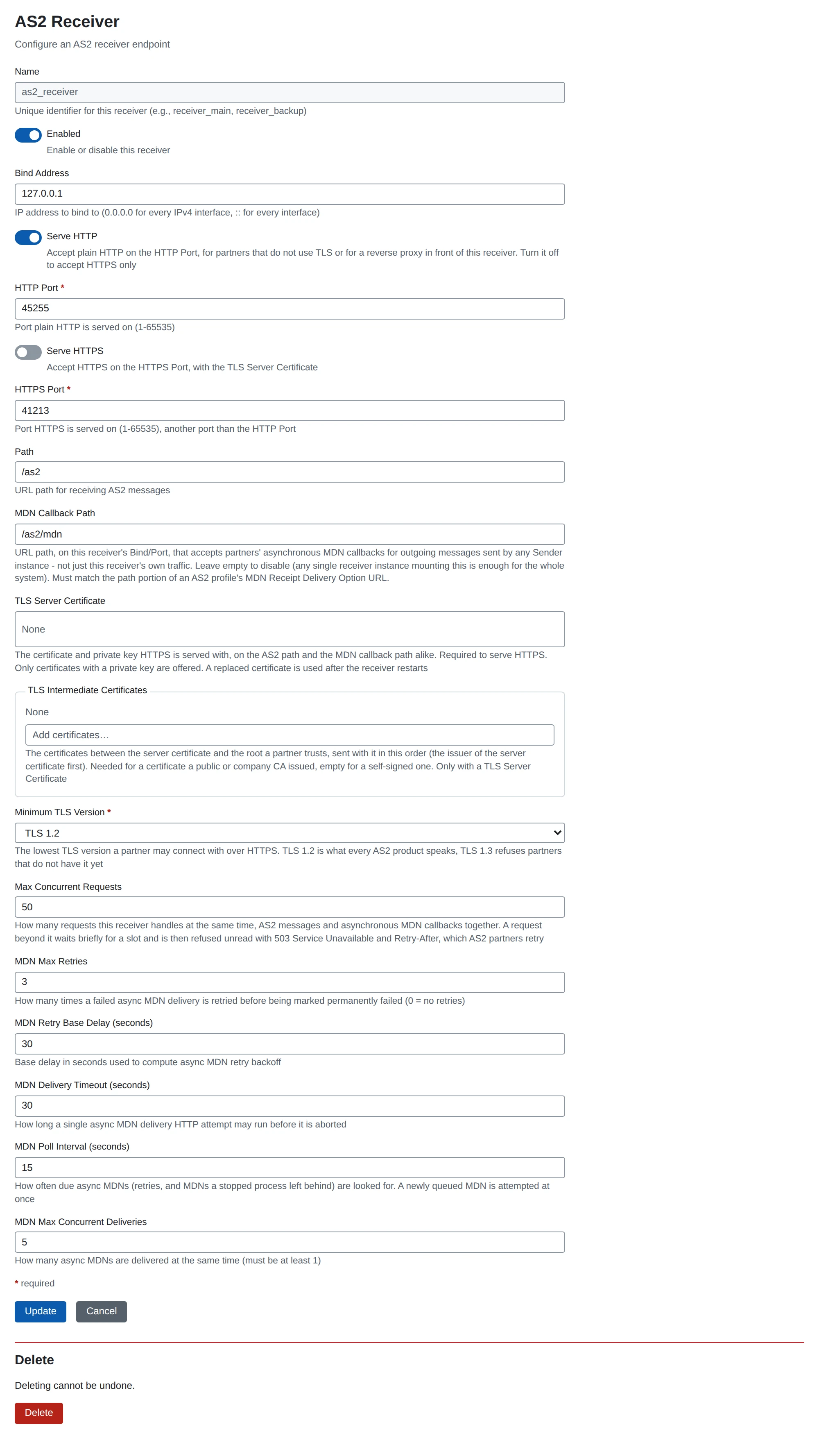
Settings
| Setting | What it does | Default |
|---|---|---|
| Name | Required. The receiver’s name. Routes use it as their source. | none |
| Enabled | Turns the receiver on or off. | on |
| Bind Address | The IP address to listen on. 0.0.0.0 is every IPv4 interface, :: every interface. | 0.0.0.0 |
| Serve HTTP | Serve plain HTTP on the HTTP Port. Turn it off to accept HTTPS only. | on |
| HTTP Port | The port for plain HTTP. | 8081 |
| Serve HTTPS | Serve HTTPS on the HTTPS Port, with the TLS Server Certificate. | off |
| HTTPS Port | The port for HTTPS. Must differ from the HTTP Port when both are on. | 8443 |
| Path | The URL path partners post messages to. | /as2 |
| MDN Callback Path | The path that accepts partners’ asynchronous receipts. Empty turns it off. | empty |
| TLS Server Certificate | The certificate HTTPS is served with. Must have its private key. | none |
| TLS Intermediate Certificates | The chain sent after the server certificate. | none |
| Minimum TLS Version | 1.2 or 1.3. | 1.2 |
| Max Concurrent Requests | Requests handled at the same time, 1 to 1000. | 50 |
| MDN Max Retries | Retries of an asynchronous receipt you send to a partner. | 3 |
| MDN Retry Base Delay (seconds) | Base of the growing wait between those retries. | 30 |
| MDN Delivery Timeout (seconds) | How long one attempt to send a receipt may take. | 30 |
| MDN Poll Interval (seconds) | How often MicroB2B looks for receipts that are due for a retry. A new receipt is sent at once. | 15 |
| MDN Max Concurrent Deliveries | Receipts sent at the same time. | 5 |
Ports. The web UI listens on port 8080 by default (HTTP_PORT).
A receiver needs another port, which is why its default is 8081.
MDN Callback Path. Your partners post asynchronous receipts here, for messages you sent.
One receiver with this path is enough for the whole system.
Its path must match the path of MDN Receipt Delivery Option on your
organization’s AS2 profile.
For example, set it to /as2/mdn.
HTTP, HTTPS, or a reverse proxy
You have three choices for how partners reach the receiver:
- HTTPS on the receiver. Turn on Serve HTTPS and choose a certificate. This suits a small installation on one host.
- Behind a reverse proxy. The proxy handles HTTPS and forwards to the receiver over plain HTTP. This suits you when you already run a proxy, or want automatic certificate renewal.
- Both HTTP and HTTPS. Serve both while partners move to HTTPS.
Recommended: use HTTPS, on the receiver or on a proxy. Some partners still send plain HTTP; AS2 encryption then still protects the message itself.
Behind a proxy on the same host, set Bind Address to 127.0.0.1.
Keep the plain HTTP port closed to everyone except the proxy.
See Reverse proxy.
Client certificates. MicroB2B cannot check a partner’s TLS client certificate behind a proxy. The receiver does not ask partners for a client certificate either.
Serve HTTPS on the receiver
- Upload the server certificate with its private key. See Certificates.
- If a public or company CA issued it, also upload the intermediate certificates, without a key.
- Open the receiver under Plugins > AS2 Receivers.
- Turn on Serve HTTPS and check the HTTPS Port.
- Choose the TLS Server Certificate.
- Add the TLS Intermediate Certificates, the issuer of the server certificate first. Leave out the root.
- Turn off Serve HTTP if you want HTTPS only.
- Save, and restart the receiver under System > Services.
Both listeners serve the same Path and MDN Callback Path. At least one of them must be on.
Some details:
- Minimum TLS Version
1.2works with every AS2 product.1.3refuses partners that do not have it. TLS 1.0 and 1.1 are not offered. - The receiver offers HTTP/1.1 only. It presents the certificate whatever server name the partner asks for.
- The receiver reads the certificate when it starts. After you choose a new one, restart the receiver.
- To renew, upload the new certificate, choose it, and restart. The receiver has no automatic renewal. If you want that, put a proxy such as Caddy in front.
- A certificate the receiver uses cannot be deleted.
- If the certificate cannot be used, the receiver does not start. The reason is shown, as for a port that is taken. That happens when the certificate is gone, has no private key, or cannot be opened with the
SECRETS_KEY.
Requests at the same time
Each receiver handles at most Max Concurrent Requests requests at once. Messages and asynchronous receipts share that limit. The limit stops a burst of large uploads from overloading the server.
A request beyond the limit waits up to 2 seconds for a free slot.
Then it is refused with 503 Service Unavailable and Retry-After: 30.
Nothing is read or stored, and no receipt is sent.
AS2 partners send the message again later, as they do after any temporary failure.
The default of 50 is generous. Usually the database slows things down before that many requests run at once.
MicroB2B logs a warning at most once a minute while it refuses requests, with the number refused.
It logs another line when the receiver has room again.
The metrics microb2b_inbound_requests_in_flight and microb2b_inbound_requests_refused_total show how close a receiver runs to its limit.
If partners report 503 errors often, raise the limit when your database keeps up. Or spread your partners over more than one receiver.
Asynchronous receipts you send
When a partner asks for an asynchronous receipt, the receiver sends it in the background. The MDN settings above control the retries. If a receipt still fails after all retries, MicroB2B raises an alert. See Receipts you send.
How the receiver names itself
Every answer of the receiver carries Server: MicroB2B/<version>.
Receipts also name MicroB2B in their Reporting-UA field.
To leave out the version, turn on Hide the version under System > Settings > Identification.
See Settings.