Testing a partner
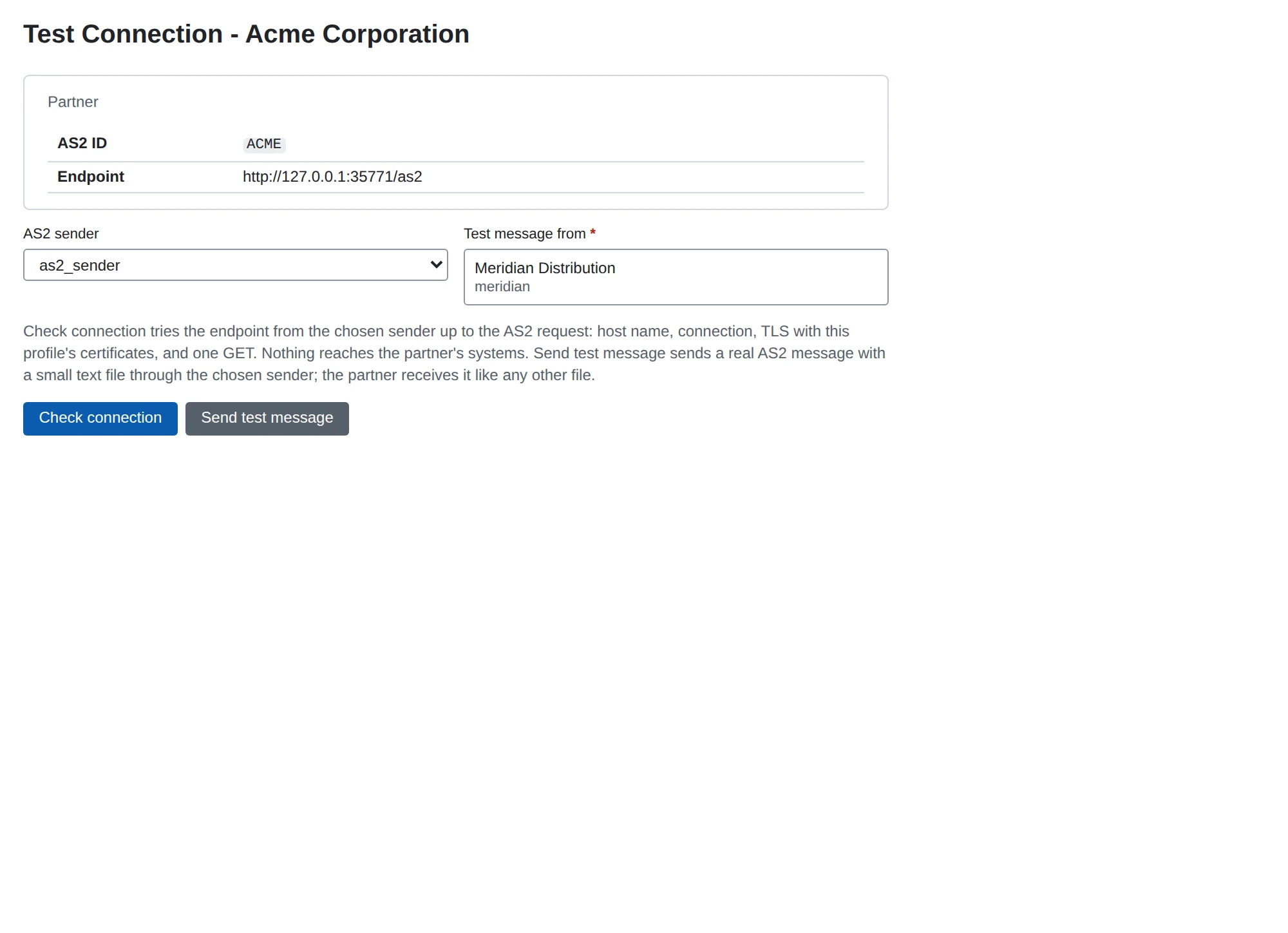
This page explains how to test the connection to a partner and send a test message. Use it after you set up a new partner, or when messages to a partner fail.
Open the test page
- Go to Partners and open the partner.
- In the AS2 section, choose Test Connection.
- Under AS2 sender, check which sender to use.
MicroB2B picks the sender the partner’s routes name. If there is only one sender, it picks that one. Otherwise you choose.
The REST API has the same two tests:
POST /api/v1/as2/remote-profiles/{partner id}/check-connectionPOST /api/v1/as2/remote-profiles/{partner id}/test-message
Check connection
Check connection tries to reach the partner’s endpoint, without sending a message.
Nothing reaches the partner’s systems beyond a single GET request.
It runs these steps:
- Look up the host name.
- Open a TCP connection.
- Do the TLS handshake, with the profile’s certificate settings.
- Send one
GETrequest.
Any HTTP answer means the endpoint is reachable.
An AS2 endpoint usually answers a GET with 405, which is fine.
The HTTP password and header values are not sent with the GET.
The report shows each step and the first failure in plain words, for example:
- “the server answered without TLS: is this an https:// endpoint on a port that speaks plain HTTP?”
- “the presented certificate does not name …”
It also shows the certificate the server presented:
- its names and fingerprint,
- whether this profile pins it,
- whether it chains to a trusted authority,
- which stored certificate it is, if any.
Use this to find which certificate to add to Partner’s TLS Server Certificates. See AS2 security.
The check runs inside the AS2 sender.
If the sender is not running, the report says so.
The REST API then answers 503 SENDER_NOT_RUNNING.
Start the sender under System > Services.
Send test message
Send test message sends a real AS2 message to the partner. It asks you to confirm first, because the partner receives a real file.
- Under Test message from, choose your organization. Only organizations with an AS2 profile are offered.
- Choose Send test message and confirm.
The message is a small text file named microb2b-test-<message id>.txt.
It says that it is a connection test, who sent it and when.
It goes through every step a normal message does: signing, encryption, compression, the post and the receipt. You need no file and no route for it.
Afterwards it is an ordinary message:
- It appears under Messages, with the source
@operator. - Its history names who sent it.
- It is retried like any message, and its receipt settles it.
- You can redeliver it.
- A failure raises an alert, like any other.
Tell your partner before you send one, so they know what the file is.
When a test fails
Open the test message’s page to see its history and the reason. AS2: sending problems lists common causes and fixes.