File writer
A file writer writes each message it gets as a file to a directory. Use it to hand documents from partners to your own systems. This page explains its settings and its filename pattern.
How it works
A file writer is a target of a route. For each message, it writes one payload stage to a file below its Base Directory. The message’s history says which file it wrote, or why the write failed.
- A write that cannot succeed fails the delivery at once. Examples: the message lacks the chosen stage, the filename pattern has no value, or the file exists and Overwrite Existing Files is off.
- Any other failure, such as a full disk, is retried after 30 seconds, 2 minutes and 10 minutes. After that the delivery fails.
- If a retry finds the file already there with exactly the right content, it counts as written.
Add a file writer
- Go to Plugins > File Writers and click + New File Writer.
- Enter a Name, such as
writer_inbox. - Enter the Base Directory, such as
/data/inbox. - Set the Filename Pattern (see below).
- Click Create.
- Restart MicroB2B so the writer starts.
- Add a route from a source, for example an AS2 receiver, to the writer.
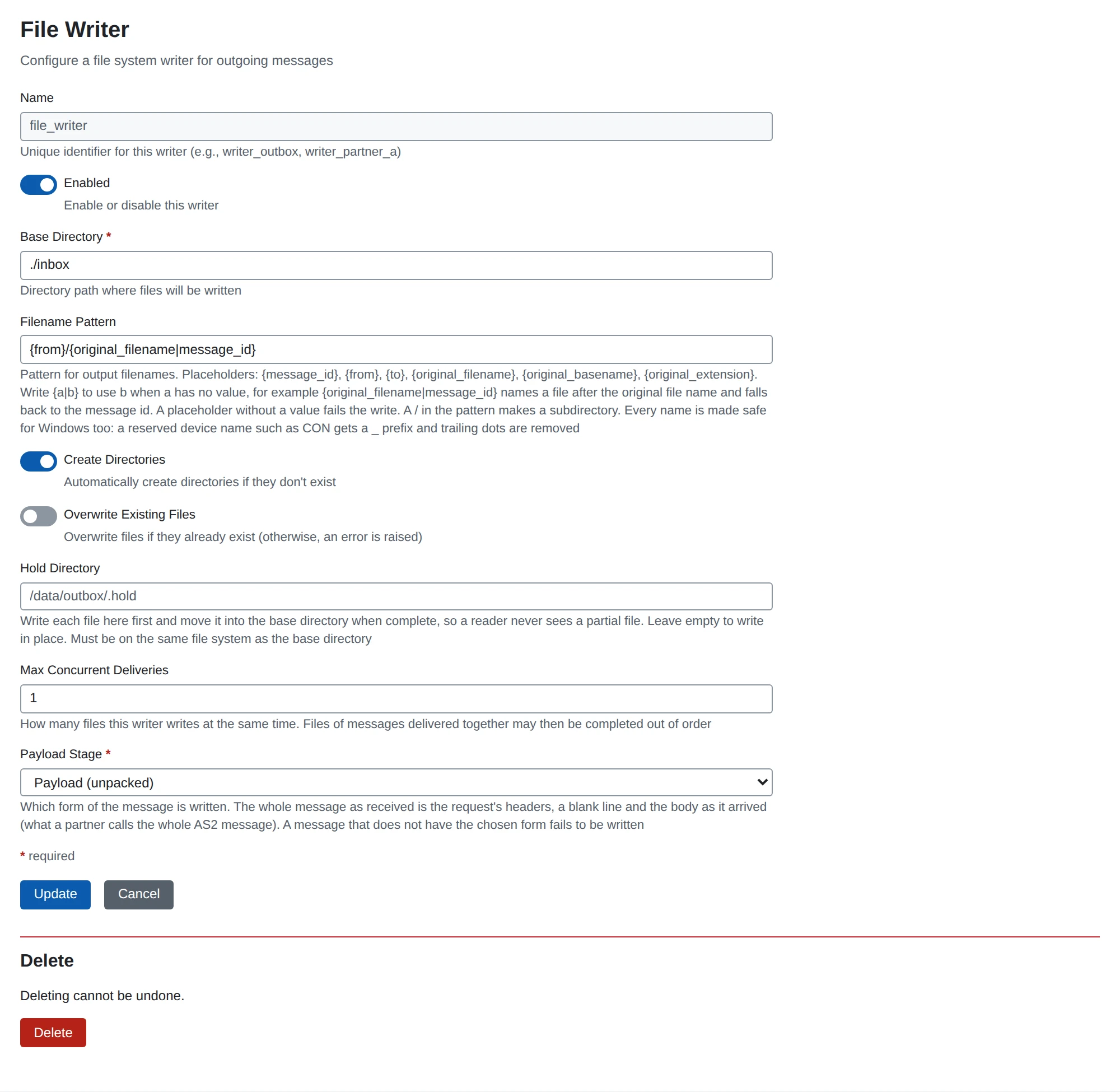
Settings
| Setting | What it does | Default |
|---|---|---|
| Name | The instance name. Lower case letters, digits, _ and -. | (required) |
| Enabled | A disabled writer does not run. | on |
| Base Directory | The directory to write to. | (required) |
| Filename Pattern | The name of each file. See below. | {message_id}.dat |
| Create Directories | Create missing directories. | on |
| Overwrite Existing Files | Replace a file that exists. When off, the write fails. | off |
| Hold Directory | Write each file here first, then move it into place when complete. A reader then never sees a half-written file. Must be on the same file system as the base directory. | (empty) |
| Max Concurrent Deliveries | Files written at the same time, 1 to 100. With more than one, files may finish out of order. | 1 |
| Payload Stage | Which form of the message is written. | Payload (unpacked) |
Payload Stage can be the unpacked payload, the whole message as received, the body as received, or the headers as received. See Payload stages.
A changed writer takes effect when you restart it on System > Services, or restart MicroB2B.
Filename pattern
The pattern is fixed text with placeholders.
| Placeholder | Becomes |
|---|---|
{message_id} | The message ID |
{from} | The sender’s name |
{to} | The recipient’s name |
{original_filename} | The original file name |
{original_basename} | The original file name without its extension |
{original_extension} | The extension with its dot, such as .xml. Empty when there is none. |
Fallbacks
{a|b} uses the first placeholder that has a value. For example, {original_filename|message_id} uses the original file name. If the message has none, it uses the message ID.
A placeholder without a value fails the write. This prevents names like report_.dat. Only {original_extension} may be empty.
Subdirectories
A / in the pattern makes a subdirectory. For example, {from}/{original_filename} writes each partner’s files to their own folder. The default file writer of a new installation uses this pattern.
Rules
- The pattern cannot be an absolute path, or contain an empty part or
... - A value from a message never adds a directory. Separators,
:, control characters and other characters that file systems reject become_. - Every name is also made safe for Windows. A reserved name such as
CONgets a_in front, and trailing dots are removed. - The result must stay below the base directory.
- MicroB2B refuses an unknown placeholder when you save.
Examples
| Pattern | Message | File |
|---|---|---|
{message_id}.dat | any | <message id>.dat |
{from}/{original_filename} | from acme, file order1.xml | acme/order1.xml |
{to}/{original_basename}_{message_id}{original_extension} | to local, file order1.xml | local/order1_<message id>.xml |