Troubleshooting
Where to look first:
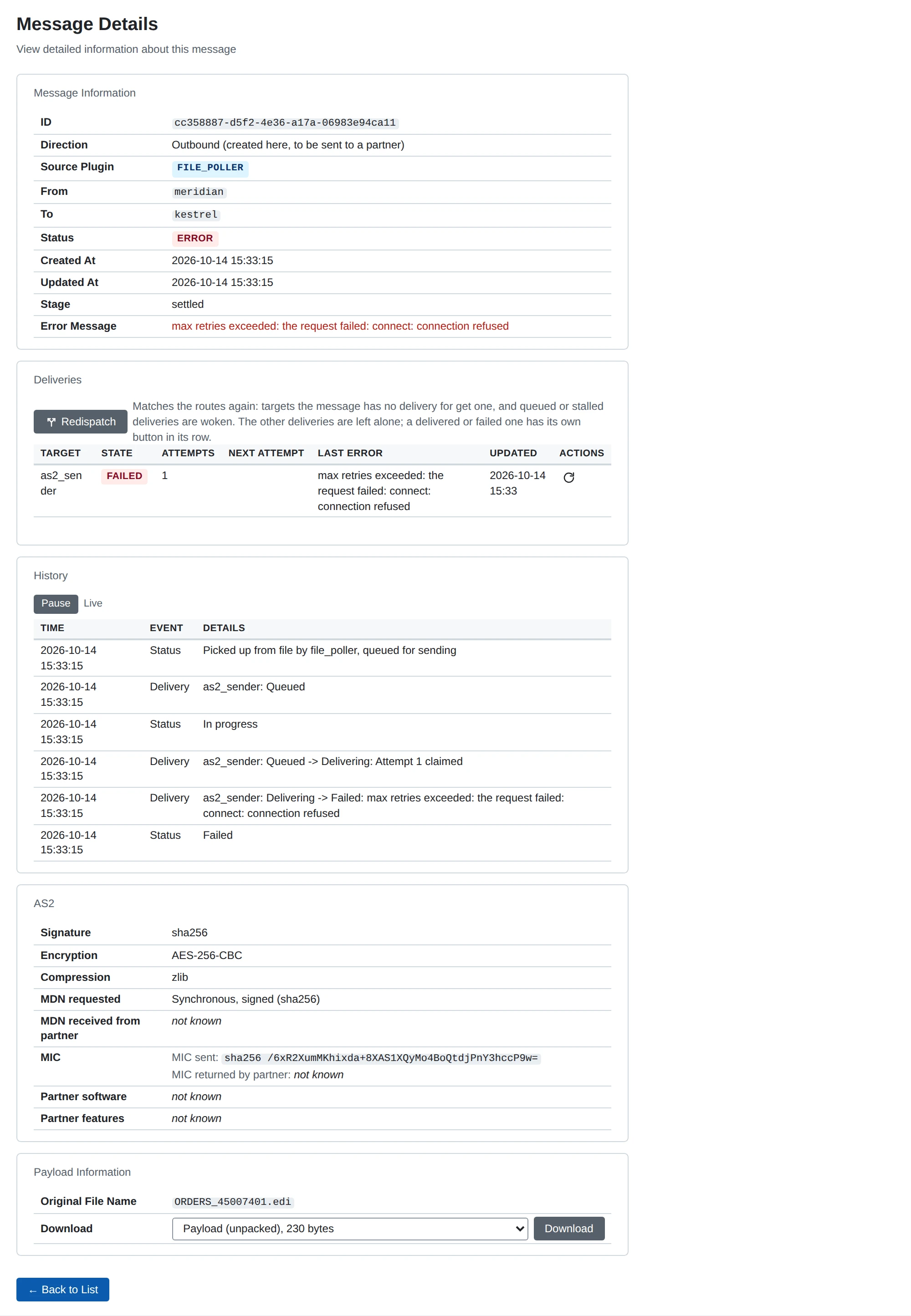
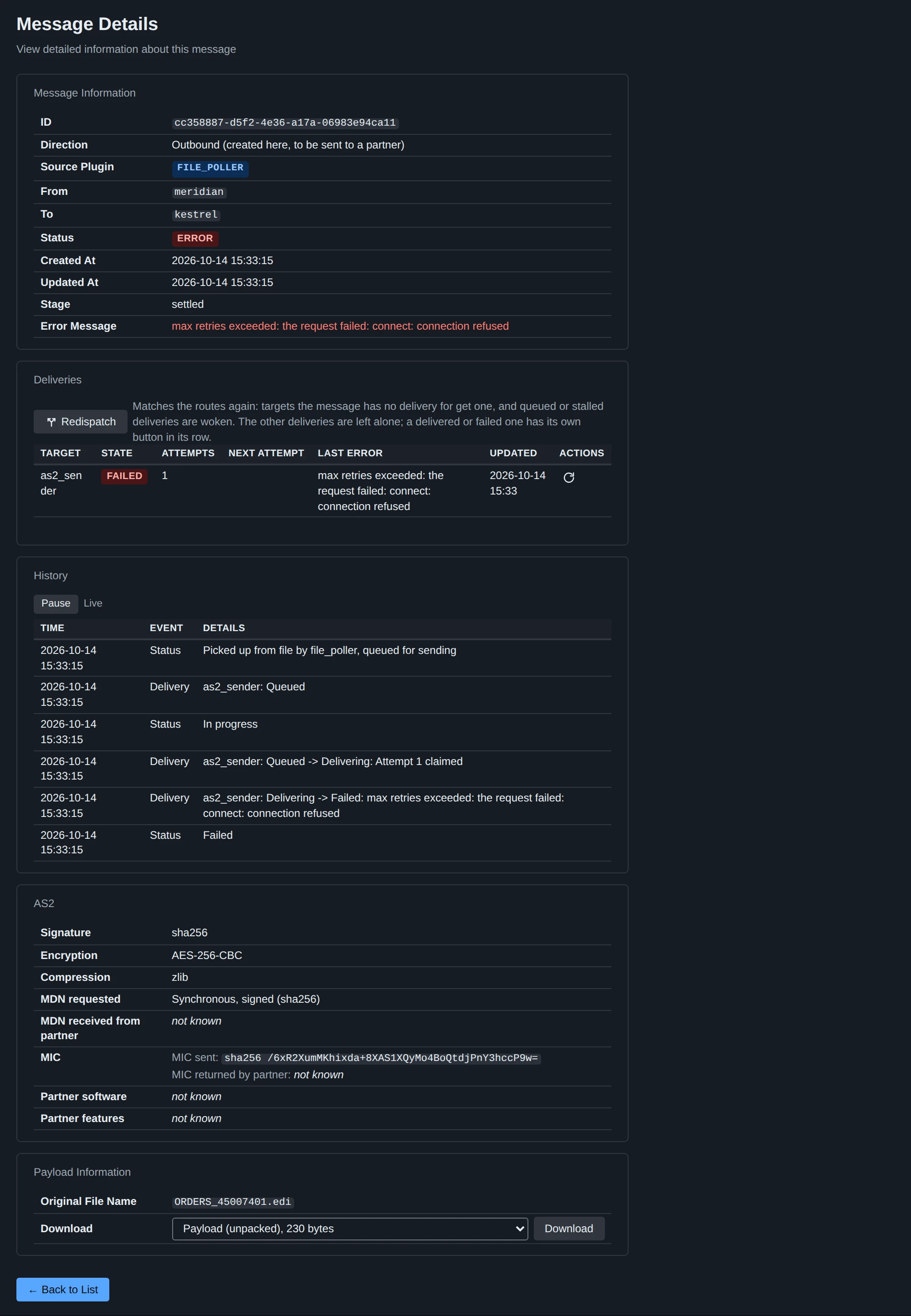
- Messaging > Messages and the message’s own page: status, a history of what happened with timestamps, the AS2 receipt (MDN) and the stored payload stages.
- System > Services: every plugin instance of the process with its state (Running, Stopped, Error with the reason, or Starting/Stopping while an action runs), how long it has been in it, and Start, Stop and Restart buttons, offered only where valid (Start when stopped or in error, Stop when running, Restart when running or in error). The API server is listed without buttons: stopping it from its own page would cut you off. A stop raises no alert; a start that fails does (
plugin_failed, which links here). A start that has not returned after 30 seconds is reported as failed (Error, “start timed out after 30s”, aplugin_failedalert) so the instance can be stopped or restarted again; the plugins are listed by type and then name. The page refreshes itself every few seconds and works without JavaScript; the same is available asGET /api/v1/servicesandPOST /api/v1/services/{type}/{name}/{action}. Changing an instance’s settings still needs a restart of that instance to take effect: Restart it here instead of the whole process. - System > Logs: every process’s log, live, filterable by level, text and message id (the Message filter takes a message id). Lines about a message carry
message_id=<id>. Raise the detail withLOG_LEVEL=debug(andLOG_STREAM_LEVEL=debugfor the page);BUNDEBUG=1adds every SQL statement. See deployment. GET /healthon the API server, andGET /api/v1/stats(with the key) for the state of every plugin instance.
The quoted messages below are the ones the program prints.
Starting
| Message | Cause and fix |
|---|---|
configuration validation failed ... invalid HTTP port: abc (must be 1-65535) | HTTP_PORT is not a port number |
... invalid DB_TYPE: sqlite3 (must be 'sqlite3' or 'postgres') | The values are sqlite3 (the default) and postgres |
... invalid DB_MAX_OPEN_CONNS "x": must be an integer (and the other DB_* pool variables: negative values, DB_MAX_IDLE_CONNS above DB_MAX_OPEN_CONNS) | Fix the variable the message names |
failed to initialize database ... failed to connect to db | DB_URL is unreachable or wrong; for PostgreSQL check host, credentials, database name and sslmode |
sqlite journal mode is ... after requesting "wal" | The database file is on a file system that cannot do WAL (some network mounts). Put it on a local disk |
failed to initialize payload storage ... reading the payload storage settings | The process could not read the global settings: the database is not reachable |
failed to start plugins ... failed to start apiserver plugin: listen tcp :8080: bind: address already in use | Another process holds HTTP_PORT |
The developer build’s web UI works on localhost:8080 but not from another machine, or a container’s published port answers nothing | The developer build’s API server listens on loopback only. Set DEVELOPER_LISTEN_ADDRESS (0.0.0.0 inside a container), see Developer listen address |
AS2 receiver HTTP server error ... address already in use | A receiver’s Port is taken, by another process or by the API server (a second receiver is offered the same default port 8081). Startup continues without that receiver: change its Port and restart |
failed to get receiver config for "x" / receiver x is disabled | The instance named on the command line does not exist in the database, or is disabled |
database is locked | Another process holds a write lock on the SQLite file for longer than the 5 second busy timeout |
Logging in and the API
| Symptom | Cause and fix |
|---|---|
A release build exits at startup with authentication: PUBLIC_URL: required and SESSION_KEY: required (or SESSION_KEY_FILE) | A release build always signs users in and needs the address users reach it at and a session key: set PUBLIC_URL and SESSION_KEY (or SESSION_KEY_FILE). See Sign-in settings |
| The login page has no Sign in with button | No identity provider is enabled, or PUBLIC_URL is not set (the redirect URIs are made of it; the list of identity providers then shows a warning) |
| A new release build starts, but nobody can sign in | There is no default user. Create the first one on the server: microb2b users create admin (with DB_TYPE/DB_URL) prints a setup link. Sign in with it, then add the identity providers in the web UI. See Users and Adding a provider |
A Sign in with … button answers 502 The identity provider cannot be reached. Please try again in a moment. | MicroB2B could not use that provider: its discovery document could not be fetched from the issuer URL, names another issuer (the URL must match exactly, trailing slash included), offers no PKCE with S256, or the client secret could not be opened. The log has Identity provider cannot be used with the provider’s name and the reason. Check the address, DNS, TLS trust and the proxy from the MicroB2B host: curl <issuer>/.well-known/openid-configuration. Password login and the other providers work meanwhile; the provider is tried again 30 seconds later, or at once after its record is saved |
The IdP says Invalid redirect_uri, invalid_redirect_uri or a redirect URI mismatch | Register exactly the redirect URI the list of identity providers shows (Access > Identity providers), <PUBLIC_URL>/ui/auth/<provider name>/callback, at the IdP: scheme, host, port and the provider’s name included. Renaming the provider or changing PUBLIC_URL changes it |
After signing in at the IdP the login page says The login did not start in this browser or took too long | The login cookie did not come back: the browser blocks cookies, the address differs from PUBLIC_URL (the cookies are Secure and __Host- prefixed, so https and the same host name), more than 10 minutes passed, or the login was started on another instance with another SESSION_KEY |
The login page says The identity provider's answer could not be verified | The token endpoint refused the code (wrong client secret, or a code used twice) or the ID token failed validation (issuer, audience, expiry, nonce, signature; the reason is in the log as Login refused). Check the provider’s client secret (enter it again on its page) and that the clocks agree |
The identity provider could not be reached on the login page | The token endpoint or key set was not reachable while signing in; the IdP is down or unreachable from MicroB2B |
After signing in at the IdP the login page says Your account is disabled in MicroB2B. (HTTP 403) | The MicroB2B user of that identity is disabled: enable it on Access > Users or with microb2b users enable <name> |
An IdP user appears in Access > Users as alice-2 | The user name made from the IdP’s claims was taken by another user, so a number was added. Users are matched to the IdP by issuer and subject, never by name; the name is only how MicroB2B shows them |
| You are sent to the login again and again | The session cookie is not kept (plain http outside localhost, a proxy removing Set-Cookie, a different SESSION_KEY per instance) or SESSION_TTL is very short |
The login says The name, password or code is not correct, or the account cannot sign in. | The answer is the same for a wrong name, password or code and for a disabled user, a user whose password login is off (a user of the identity provider: use the Sign in with button) or one whose setup is not finished; the log line Sign-in refused (with user and factor) says which. Check the authenticator app’s clock (a code is valid for 30 seconds, one step either way) and that the code was not already used. microb2b users list shows whether the user is enabled and has a password and TOTP; the user’s page on Access > Users shows whether password login is on |
Too many failed sign-ins. Try again in N seconds. (HTTP 429) | Failed logins of the account (more than 3) or of the client address (more than 20) make the next attempt wait, doubling up to 15 minutes. Wait, or restart the API server, which forgets the counts. There is no lock and nothing to unlock. Behind a reverse proxy all clients share its address |
| A user is locked out of password login (forgot the password, lost the phone and the recovery codes) | Another user resets them on Access > Users, or on the server microb2b users reset-password <name>, reset-totp <name> or reset <name> (with DB_TYPE/DB_URL) prints a new setup link. When nobody can sign in, microb2b users reset <name>, microb2b users password-login <name> on (for a user of the identity provider) or microb2b users create <name> on the server is the way in. See Recovery |
A setup link says This setup link does not work | It was used, replaced by a later reset, is older than 24 hours, or the user’s password login was turned off. Make a new one: reset the user on Access > Users or with microb2b users reset-password <name> |
microb2b users create prints /ui/setup/... without an address | PUBLIC_URL was not set for the command; put the address users reach MicroB2B at in front of the path |
Every REST API request is 401 with code MISSING_AUTH_HEADER or INVALID_TOKEN | The request has no Authorization: Bearer header, or its token is no working API token and no access token of a user or a registered service account of an enabled identity provider. Make a service account and a token for it (Access > Service accounts, or microb2b service-accounts); a machine client of an identity provider must be registered as a federated service account. INVALID_TOKEN never tells the client why; the server’s WARN line API request refused does, in reason (“lacks the required scopes microb2b/api”, “service account not found”, “was revoked at …”, “no enabled identity provider has the token’s issuer …”) |
microb2b users reset or reset-password says password login is off for <name> | The user signs in at the identity provider, or their password login was turned off. Turn it on with microb2b users password-login <name> on, which prints a setup link when one is needed |
Disabling, deleting or turning password login off is refused: <name> is the last user who can sign in | Nobody could sign in afterwards. Create another user first, or repeat with --force |
API: 401 with code INVALID_TOKEN | The token is not valid for this server: an issuer no enabled identity provider has (the issuer URL must match the token’s iss exactly), an audience other than that provider’s API audience (the client id when empty; the service client’s tokens usually need an audience mapper), a signature that does not verify, a not-yet-valid time. The reason is in the log at debug level (Bearer token rejected), never in the answer |
API: 401 with code TOKEN_EXPIRED | Get a new access token; check the clocks of the IdP and MicroB2B |
The page header carries a banner Developer build: anybody can sign in as the developer | You are running the developer build: its login page has a Sign in as developer button and its REST API accepts every request. It is for development only; never expose it to a network |
--reset-db or --fixtures fail with unknown flag | Only the developer build has them; a release build does not contain them |
Startup stops with stored records break the rules of their forms and REST API | A fixture holds a value the form and the REST API would refuse; each line names the record, the field (its JSON property) and the rule. Fix the fixture |
A form fails with CSRF token invalid or CSRF token missing | The token the page carried is gone: the server restarted, two hours passed since the page was loaded, or cookies are blocked. Reload the page and submit again. Two instances reached under one host name but different ports overwrite each other’s cookies; use different host names |
API: 401 | Send Authorization: Bearer <access token>; the error code says why the request was refused |
API: 400 with code INVALID_INPUT, message Validation failed | details names each rejected property; they are the same rules and wording the web form applies |
| Browser application on another origin cannot read API responses | Set ALLOWED_ORIGINS, see deployment |
| The UI works but live parts (message list, history, log tail) do not update behind a proxy | The proxy buffers text/event-stream; disable buffering for the UI |
Configuration that does not take effect
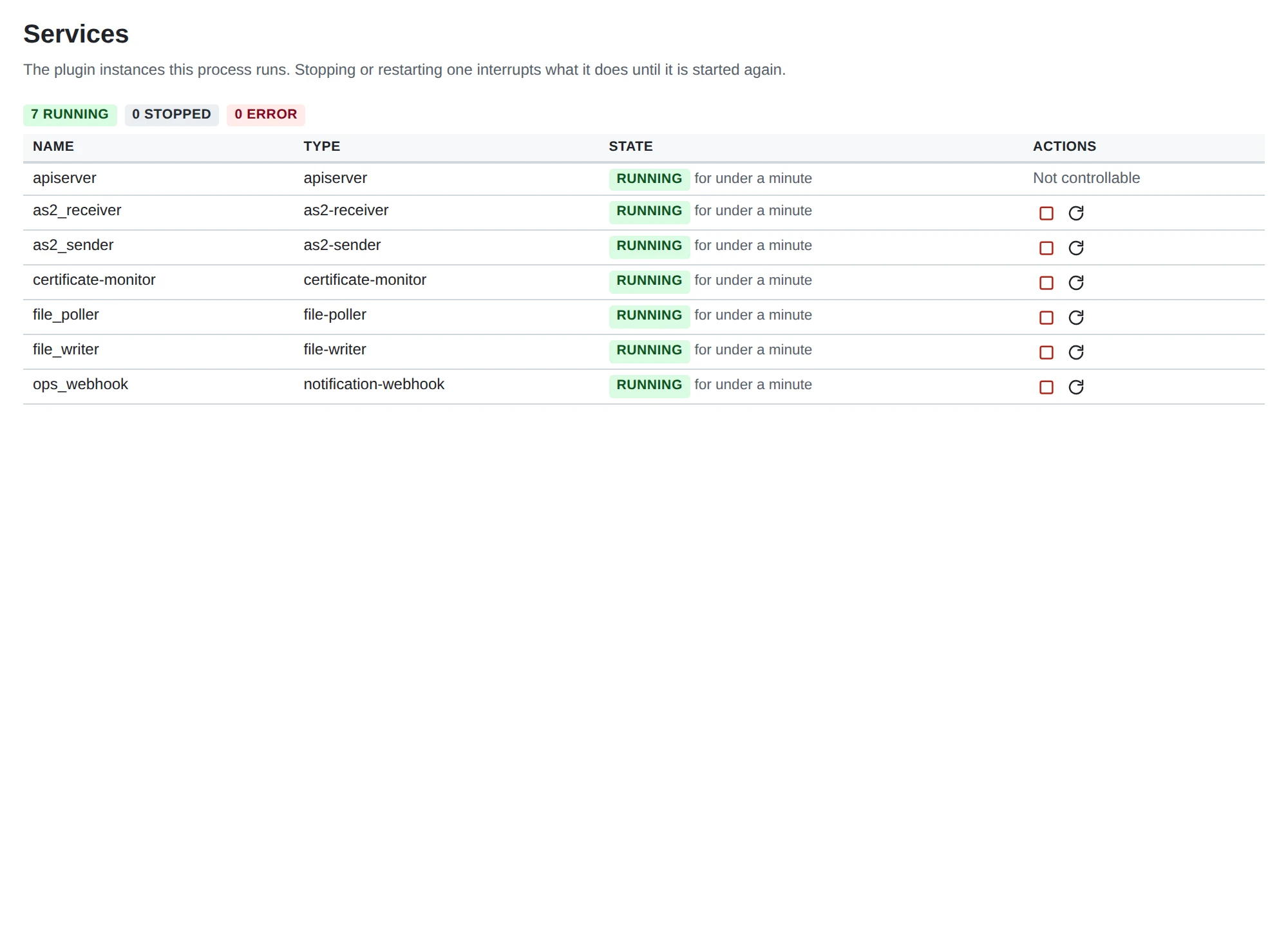
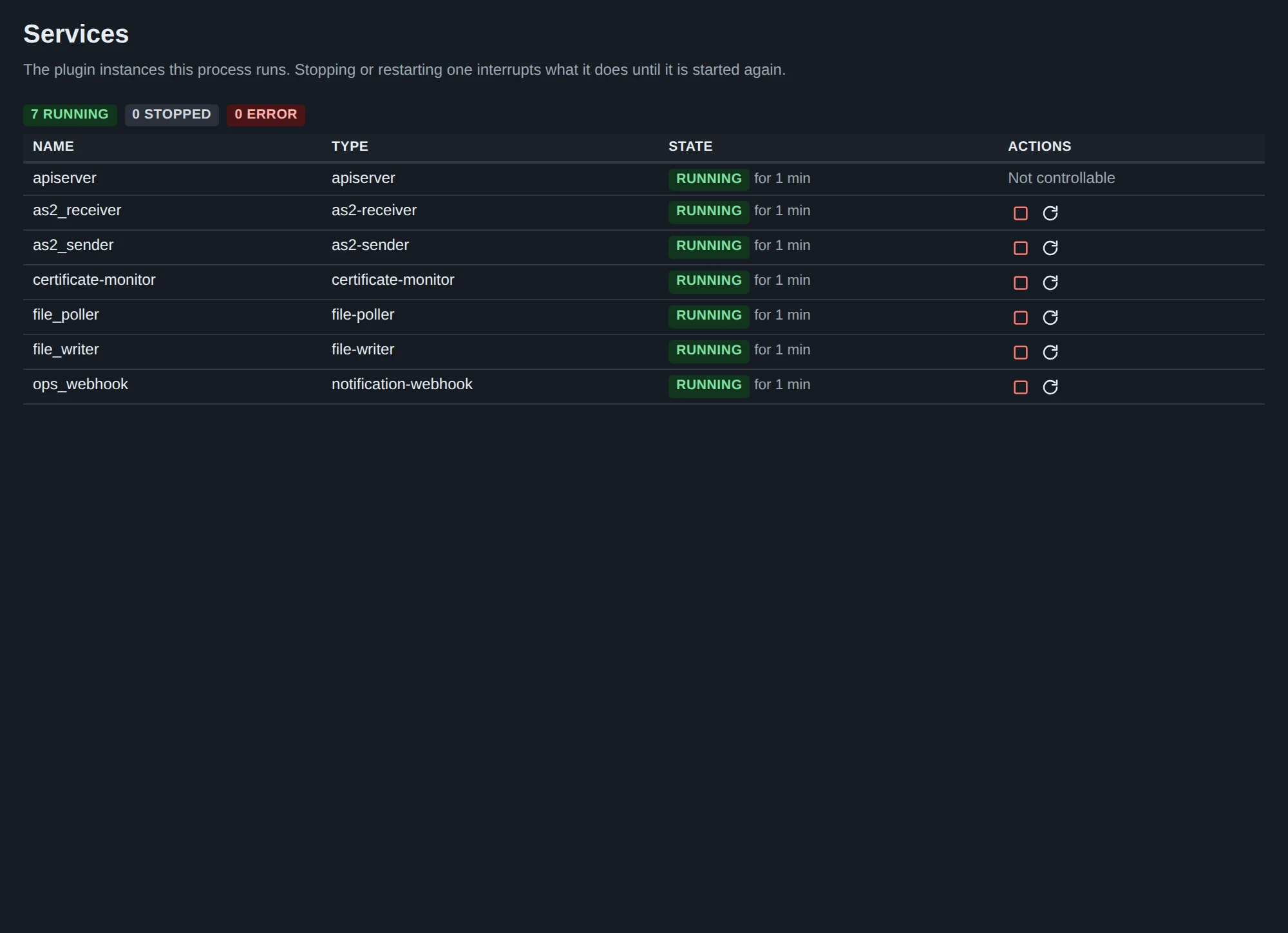
- A new or changed plugin instance does nothing. Instances are read when they start. Restart the instance on System > Services, or MicroB2B. Routes, organizations, partners, AS2 profiles and certificates apply without a restart; a route applies to messages dispatched after you saved it, so a message that was already dispatched (or ended Not routed) is not delivered by it.
- A route is refused.
Source Plugin: "x" is not availablemeans no enabled instance of that name exists.redundant with route N (...): one covers the other, so the target would receive every message twicemeans an existing route with the same source and target already covers it; delete or narrow one. Routes use the names of organizations and partners (or Any), not AS2 IDs. - A partner AS2 profile is refused:
Messages to this partner are encrypted to the partner's certificate, but none is chosen.The default Encryption Algorithm needs a Partner Certificate. Choose the certificate, or set the algorithm to None. - A plugin form is refused, for example the file poller with
is required unless Delete After Send is set(Processed Directory) oris required unless the path pattern has {to}(To). The messages name the field. - Nothing happens when a plugin instance is created. It does not run until the restart above, and a disabled instance never runs.
Files
A file in the poller’s folder is not picked up.
- The poller creates its Base Directory when it starts. If it cannot (the path is a file, or a parent is not writable), the instance is in state Error on the Services page and a
plugin_failedalert names the directory and the cause; fix the path and start it again. - The file’s path must fit the Path Pattern (
{to}/{filename}expects<base>/<partner name>/<file>, exactly that deep) and the file name must match the File Pattern (default*.*, so a name without a dot is skipped). - A file whose folder is not a partner’s name, or that has no sender, is moved to
<base>/unroutable/with a<file>.reason.txtbeside it, and the log saysfile: file is unroutable, moved aside. The reason names the folder it did not recognize ("x" is not a business partner) or says there are several organizations and the path does not say which (set From, or use{from}in the pattern). - The instance must be enabled and started (restart after creating it).
A received message is not written. Check that the writer is enabled, a route sends the receiver’s messages to it, and the log. Messages from the writer: Unable to write file (permissions, or a missing directory with Create Directories off), file exists and overwrite is disabled, filename pattern "..." ... with the reason when a placeholder has no value (use {original_filename|message_id}), the payload could not be read from storage, and the message has no "<stage>" payload (it has: ...) when the Payload Stage chosen does not exist for the message: only received AS2 messages have received, headers and the whole message; every message has unpacked.
Messages
Every message has one status, derived from its deliveries (see Routing). The Messages page filters by it and the message page shows each delivery beside it.
| Status | Meaning | What to do |
|---|---|---|
| Received | Stored; the source is still checking it (an inbound AS2 message is unpacked and verified first) | Nothing. A message that stays here for more than a few seconds means its source stopped midway; the AS2 receiver settles such a row at its next start, and the partner resends |
| In progress | Dispatched; at least one delivery is waiting for its target or being worked on | Nothing. If it does not move, look at the target on System > Services: a target that never takes it up leads to Stalled |
| Retrying | A delivery attempt failed and another is scheduled (the time and the reason are in the history) | Nothing, unless the cause needs fixing (a partner’s endpoint, a full disk); Redeliver tries at once |
| Awaiting receipt | Sent; the partner promised an asynchronous receipt (MDN) that has not arrived. If it has not arrived within the partner profile’s receipt timeout (default 24 hours) the delivery fails with no receipt within <duration> and the message is Error; a receipt that comes later is refused and logged as unattributable | Wait, or ask the partner whether it processed the message |
| Stalled | A delivery was announced to its target the configured number of times and the target never took it up (it is stopped, disabled or overloaded). The alert delivery_stalled is raised | Start or enable the target; it takes the delivery up at its start. See below |
| Delivered | Every delivery is done and, where a receipt was requested, confirmed | Nothing. Send again repeats a delivery if a file or downstream copy was lost |
| Not routed | No route matched the message, so nothing was delivered. The alert message_not_routed is raised | Add a route and press Redispatch on the message’s page (see Redispatch and redeliver) |
| Refused | An inbound message was turned down: a repeat or replay, an unknown party, a failed verification, over the size limit. The history line says which; no alert is raised | Usually nothing; it is the partner’s message. See Receiving fails for the reasons |
| Error | A delivery failed for good, or MicroB2B itself failed to take the message in. The history line and the alert message_failed say why | Fix the cause, then Redeliver the failed delivery. See Sending fails |
A delivery is stalled
Every delivery is announced to its target when it is created. A target that does not take it up gets the announcement again after 10 seconds, 30 seconds, 2 minutes and 10 minutes (the sweep, which runs every 5 seconds in the process that owns the database). When the number of announcements set under System > Settings > Delivery (default 5, so about 22 minutes and 40 seconds after the message was dispatched) has passed without the target claiming the delivery, the delivery is stalled, the message shows Stalled and one delivery_stalled alert is raised per delivery (alerts about the same target share a dedupe key, so a notifier folds a stopped target’s backlog into one notification). Nothing was attempted.
The usual cause is a target that is not running: stopped on the Services page, disabled, or crashed. Start it: at its start it takes up the stalled deliveries and the due ones, and they proceed as usual. A target that is running but overloaded takes up a backlog bigger than it can claim within that time; raise its concurrency (max_concurrent_deliveries) or the number of announcements. The sweep also puts a delivery back to Retrying when the process that was working on it died or hung past its lease (the history says attempt interrupted: lease expired).
Redispatch and redeliver
The message page lists the message’s Deliveries (one per target: state, attempts, next attempt, last error) with an Actions column in the table for what an operator may do with a delivery (a circular-arrow icon button; hover it for its name, “Redeliver to <target>” or “Send again to <target>”), and a Redispatch button above the table for the message. Both actions record a history line naming you, and a delivery_changed line for every delivery they touch. They are also available on the REST API (Redispatch and redeliver).
| Action | Offered when | What it does |
|---|---|---|
| Redispatch | The message has left the stage accepted (every message on the Messages page except one its source is still storing) | Matches the routes again: a target the message has no delivery for gets one (this is how a route added after the message arrived takes effect), and queued and stalled deliveries are woken again. Delivered, failed and in-progress deliveries are left alone. When there is nothing to do (“Nothing to redispatch: the routes match no new target and no delivery is waiting.”) nothing is changed and no history line is written |
Redeliver to <target> | The delivery is Failed, Stalled or Retrying | Asks first, then sends that one delivery again from the start: attempts are counted from zero and the last error is cleared. Use it for a delivery that ended after you fixed its cause (a partner’s endpoint, a full disk), or to try a retrying one now |
Send again to <target> | The delivery is Delivered | Asks first, then sends the message to that target a second time, for when the file or the downstream copy was lost. The message goes back to In progress and ends Delivered again; the history shows both passes |
Send again to an AS2 sender deserves care. The message is sent with the same AS2 Message-ID, so the partner treats it as a repeat of a message it already has. A partner may answer with the receipt it stored the first time, with a failure receipt for a duplicate, or with no receipt. If a requested receipt does not arrive the delivery fails at the receipt deadline and the message ends in Error; the partner still has the message from the first pass. A partner that deduplicates will not process the payload again, so Send again does not recreate a file the partner lost; ask the partner to reprocess it. To a file writer the file is written again if it is missing, an identical file already there counts as written, and a different file of that name fails the delivery unless Overwrite is on. To an HTTP post target the payload is posted a second time.
A page that was open before the state changed may offer an action that does not apply any more; it is refused with the reason and the page shows where things stand.
Sending fails
The log line names the cause; the message page shows its history. The sender retries up to Max Retries times, waiting an exponentially growing time from Retry Base Delay (a partner’s AS2 profile, section Delivery, can set its own number of attempts, a fixed wait and a timeout); after that the message is Error with max retries exceeded: ....
| Message | Cause and fix |
|---|---|
failed to send HTTP request: Post "...": dial tcp ...: connection refused (or no such host, i/o timeout) | The partner’s Endpoint is wrong or unreachable from this host. Test it with curl from the same machine |
received non-success status: 500 Internal Server Error | The partner rejected the message at HTTP level; its log says why |
cannot request an MDN from partner "X": the organization's AS2 profile "Y" has no MDN Notification To | Set MDN Notification To on the organization’s AS2 profile, or set Request MDN to None on the partner’s |
cannot request an asynchronous MDN ... has no MDN Receipt Delivery Option | Asynchronous receipts need the organization’s MDN Receipt Delivery Option (the URL partners post receipts to) and an AS2 Receiver whose MDN Callback Path is that URL’s path. Or use Synchronous |
signing certificate 3 (...) has no private key | The certificate chosen to sign was uploaded without its key. Upload the key (certificate and key together) and choose that |
our TLS client certificate N (...) has no private key, partner TLS server certificate N (...) | The TLS certificates of the partner profile’s Connection section |
additional HTTP header "..." ... | An entry of the profile’s Additional HTTP Headers is malformed or sets a header the AS2 message defines itself |
failed to load the payload of message ... / the message has no "unpacked" payload | The payload blob or its record is missing; see Storage |
The partner’s receipt (MDN) is rejected
A synchronous receipt is checked against the message that was sent. When it does not confirm delivery the message ends in Error at once with synchronous MDN: <reason> and is not retried; fix the cause and send the message again from its source:
| Message | Meaning |
|---|---|
synchronous MDN from "X" does not confirm delivery: ... | The partner answered with a negative disposition; the text after the colon is theirs (for example authentication-failed, decryption-failed, insufficient-message-security: their security settings do not match the partner profile here) |
as2: the partner answered a message that asked for a synchronous MDN without one | The partner’s system does not return receipts in the response. Set Request MDN to Asynchronous or None, or fix the partner |
as2: the MDN has no Received-content-MIC for a signed receipt, ... does not match the message sent, ... uses an unsupported algorithm | The receipt does not prove the content the partner received. The message page shows both MICs. A mismatch usually means the partner changed the payload, or signed with another algorithm than Signature Algorithm |
as2: the MDN is for a different message than the one sent | A partner system answered with another message’s receipt |
no certificate configured for this partner's MDN signatures and no system trust store | A signed receipt cannot be verified: choose the Partner Certificate, or Partner MDN Signature Certificates |
Asynchronous receipts arrive at this installation’s receiver, at its MDN Callback Path. A receipt that is refused is logged with one of async MDN callback missing required AS2-From or AS2-To header, ... from an unrecognized partner, ... signature verification failed, ... does not match any outgoing message. Until it arrives the message stays Awaiting receipt.
Receiving fails
The partner gets an MDN that refuses the message (its disposition is one of those in What our MDNs say), or when it asked for no receipt an HTTP 400 (the message or the partnership is at fault), 413 (over the size limit) or 500 (ours: storage, database) with a short plain-text reason. The message on this side is Refused or Error where it got far enough to be stored, and its history and the log name the cause; the MDN says less.
| Partner sees | Cause and fix |
|---|---|
processed/error: unexpected-processing-error, the log says no local AS2 profile for AS2-To | The AS2-To of the message is not the AS2 ID of any organization’s AS2 profile here |
processed/error: authentication-failed, the log says no remote AS2 profile for AS2-From | The AS2-From is not the AS2 ID of any partner’s AS2 profile. AS2 IDs are compared exactly, case included |
processed/error: authentication-failed | The signature does not verify against the Partner Certificate (or Additional Partner Certificates), or a signature came from a partner with no certificate configured (as2: signed message from a partner with no partner certificate to verify it with). Upload and select the partner’s current certificate |
processed/error: decryption-failed | The partner encrypted with a certificate that is none of ours (the partner profile’s Our Certificate, the organization’s Our Certificate or Additional Certificates). Send them the right public certificate |
processed/error: insufficient-message-security | Require Incoming Signatures and Require Incoming Encryption are on (the default) and the message was not signed or not encrypted (this partner's messages must be signed ...). Have the partner enable them, or switch the requirement off for this partner |
processed/error: decompression-failed | The content could not be decompressed; the partner’s log and the stored received stage show what arrived |
processed/error: unexpected-processing-error | Our side (storage, database: see the log line before it and Storage or Database), or content that could not be read (the stored received stage shows what arrived) |
failed/failure: unsupported format / unsupported MIC-algorithms | The partner requires a signed MDN with a protocol or MIC algorithms we do not support; have it allow pkcs7-signature and sha256 |
failed/failure: sender-equals-receiver | The partner sent with its AS2-From set to the AS2-To |
| HTTP 405 on GET | Only POST is accepted at the receiver’s path |
HTTP 400 as2: missing required AS2 headers | The request is not AS2 (no AS2-From or AS2-To) |
HTTP 400 as2: invalid AS2 identifier: AS2-From ... | The header is no AS2 ID: a character outside printable ASCII, a " or \ inside the name, or an unclosed quote |
| A partner reaches the wrong endpoint | The AS2 receiver listens at its Bind address, Port and Path, not on HTTP_PORT; in a container or behind a proxy that port must be published |
Certificates
- Upload errors.
unrecognized certificate file,PKCS#12 password missing or incorrect,the upload contains no certificate, an encrypted PEM key (is an encrypted private key, which is not supported; decrypt it first) and a key that matches no uploaded certificate.openssl rsa -in key.pem -out plain.pemremoves the passphrase. Only RSA and ECDSA keys are supported. - Expiry. A certificate that is expired or within 30 days of it is flagged on the Certificates page (filter Status) and logged hourly by the certificate monitor (
certificate expired,certificate expiring, withdays_remaining); the gaugemicrob2b_certificates_expirycounts them, and each raises an alert event (once per state per 24 hours; see deployment). - A certificate is missing from a picker. Pickers for our signing, decryption, MDN-signing and TLS client certificates list only certificates stored with a private key; the partner’s are any.
Storage
- Test storage on System > Settings stores, reads back and deletes a probe with the saved settings and says which step failed and why: try it first.
- Local: the operating system’s error (permission denied, no space left) from the storage directory (System > Settings,
./payloadsin a new database). Fix ownership and free space. - S3:
failed to store blob to S3,failed to retrieve blob from S3,failed to read blob data from S3, each wrapping the SDK’s error: a missing bucket (or a misspelled S3 Bucket), denied access or invalid keys (the process’s AWS credentials), a redirect (wrong S3 Region), or a connection error (check S3 Endpoint; MinIO needshttp://host:9000). - Saved settings that do not seem to apply: a process reads the settings when it starts. The settings page says when the saved storage differs from the one in use; restart every process.
the message has no "x" payload (it has: ...): a payload stage is read by the record in the database, so a blob that was copied or restored without the database (or the reverse) is not found. Restore both together.
Database
- SQLite
database is locked: another process holds a lock longer than 5 seconds. Stop long-runningsqlite3sessions. - PostgreSQL refusing connections because its connection limit is reached: lower
DB_MAX_OPEN_CONNS; every process has its own pool. - Startup fails creating the schema: the log has the failing statement. Tables are created from the models only when missing and never altered, so a database from a different version needs to be replaced by an empty one.
- Start over in development with
--reset-db(developer mode only, destroys the data). - Look at the data in development: the developer build’s Database page (
/ui/database) lists the tables and runs SQL; see Database console.
Reporting a problem
Include the version (/health), the failing message’s page (history, MDN panel), its log lines (Logs, filter by the message id), the relevant instance settings with secrets removed, and how MicroB2B is deployed.