Messages that do not arrive
This page helps when a file is not picked up, a message is not routed, a delivery stalls or a received message is not written. Each heading is what you see. Below it are the likely causes and what to do. For AS2 errors, see AS2: sending problems.
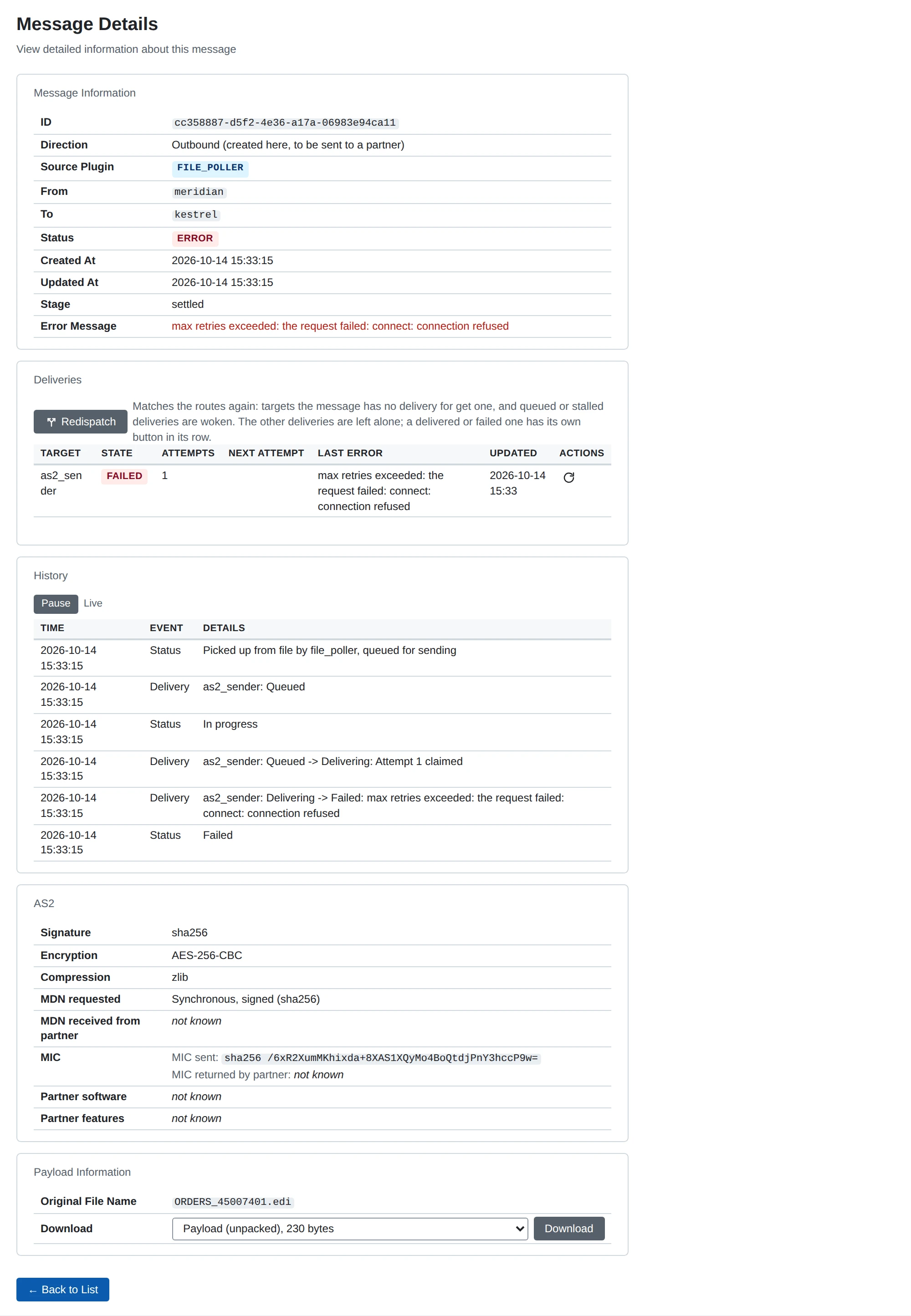
Start on the message’s own page. Its history and its Deliveries table almost always say what went wrong.
What each status asks of you
| Status | What to do |
|---|---|
| Received | Nothing. MicroB2B is still checking the message. If it stays here, see below |
| In progress | Nothing. If it does not move, check the target on System > Services |
| Retrying | Usually nothing. Fix the cause if the history names one. Redeliver tries at once |
| Awaiting receipt | Wait for the partner’s receipt, or ask the partner whether it got the message |
| Stalled | Start or enable the target. See A delivery is stalled |
| Delivered | Nothing |
| Not routed | Add a route, then Redispatch. See A message is Not routed |
| Refused | Usually nothing: the partner’s message was turned down. See AS2: receiving and certificates |
| Error | Fix the cause the history names, then Redeliver |
Messages explains each status in full.
A file in the outbox is not picked up
Check these in order:
- Is the file poller running? Look on System > Services. A new or changed poller runs only after you restart it. A disabled one never runs.
- Could it create its directory? The poller creates its Base Directory when it starts. If it cannot, it is in state Error, and a
plugin_failedalert names the directory and the cause. Fix the path or the permissions, then start it again. - Is the file at the right depth? The Path Pattern decides where files must be. The default
{to}/{filename}expects<base directory>/<partner name>/<file>, exactly that deep. - Does the name match the File Pattern? The default is
*.*, so a name without a dot is skipped. - Has it waited long enough? The poller looks every Polling Interval, 5 seconds by default.
See File poller.
A file is moved to unroutable/
The poller could not tell who the file is for or from. It moves the file to <base directory>/unroutable/ and writes a <file>.reason.txt beside it. The log says file: file is unroutable, moved aside, and a file_unroutable alert is raised.
Read the .reason.txt file:
"x" is not a business partner: the folder name is not the name of a partner. Use the partner’s name in MicroB2B, such asacme, not its AS2 ID or display name.- There are several organizations and the path does not say which one sends. Set From (Organization) on the poller, or use
{from}in its Path Pattern.
Fix the cause, then move the file back into the outbox.
A message is Not routed
No route matched the message, so nothing was delivered. A message_not_routed alert is raised.
- Go to Messaging > Routes. Check that a route has this source, and From and To that match the message’s parties (or Any).
- Check that the route’s target is enabled.
- Add or fix the route.
- On the message’s page, choose Redispatch. MicroB2B matches the routes again and delivers to any new target.
A route applies to messages that arrive after you save it. That is why the old message needs Redispatch. See Routes and Message actions.
A delivery is stalled
MicroB2B tells a target about each delivery. If the target does not take it up, MicroB2B reminds it after 10 seconds, 30 seconds, 2 minutes and 10 minutes. After the number of reminders set in Wake-ups before a delivery stalls on System > Settings (5 by default, about 23 minutes), the delivery is Stalled. A delivery_stalled alert is raised. Nothing was attempted.
The usual cause is a target that is not running. It is stopped, disabled or failed to start. Start it on System > Services. When it starts, it takes up its stalled deliveries and they continue normally.
A target that runs but is overloaded cannot keep up with a large backlog. Raise its Max Concurrent Deliveries, or raise Wake-ups before a delivery stalls on System > Settings. See Settings.
If the history says attempt interrupted: lease expired, MicroB2B stopped or hung in the middle of an attempt. The delivery goes back to Retrying by itself.
A message stays Received
The source stopped while it was taking the message in, for example because MicroB2B was killed. The AS2 receiver cleans up such messages when it starts again, and the partner sends the message again. You do not need to do anything.
A message is In progress and does not move
A delivery waits for its target. Check the target on System > Services. If it is not running, the delivery becomes Stalled after the reminders run out.
A message is Awaiting receipt
The message was sent, and the partner promised a receipt later. If it does not arrive within the partner’s receipt timeout (24 hours by default), the delivery fails with no receipt within <duration> and the message becomes Error. A receipt that arrives after that is refused. Ask the partner whether it received and processed the message. See AS2 receipts.
A received message is not written to a file
Check that the file writer is enabled and running, and that a route sends the receiver’s messages to it. Then read the delivery’s last error:
| Error | What to do |
|---|---|
Unable to write file | Check the permissions of the directory. With Create Directories off, the directory must already exist |
file exists and overwrite is disabled | A file with that name is already there. Move it away, or turn on Overwrite Existing Files |
filename pattern "..." ... | A placeholder had no value. Give it a fallback, such as {original_filename|message_id} |
the payload could not be read from storage | See the storage section of MicroB2B does not start |
the message has no "<stage>" payload (it has: ...) | The Payload Stage does not exist for this message. Every message has unpacked. Only received AS2 messages have the others |
After you fix the cause, Redeliver the failed delivery. See File writer.
Redispatch or Redeliver is refused
The page was open while the message changed. The action does not fit the message’s current state. MicroB2B shows the reason and the page shows the current state. Reload and choose again.
Nothing to redispatch: the routes match no new target and no delivery is waiting. means there was nothing to do. To send a delivered message again, use Send again on its delivery instead. See Message actions.